The following pop-up message may appear when a form opens in Clarify Classic Client:
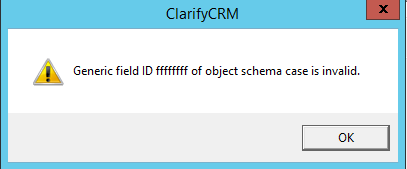
It may refer to any schema object depending on the specifics of the situation.
Clarify debugger helps to pinpoint the problem down to the Me.DoDefault line within Form_Load() subroutine of a customized form but no other information is available other than this entry in standard.out file:
ERROR processing

   event, code:
   0x500009

Generic field ID ffffffff of

    object schema

     case

      is invalid. (
      0x500009)
This pop-up message may appear twice if the form has tabs because the Form_Load() subroutine also gets executed for the default tab.
This problem is caused by a contextual object referring to a table column which is not defined in the database schema.
It may be quite cumbersome to find out which contextual object is causing this, so the following SQL statement has been designed to help:
   select w.id

    as
    "WIN ID"

,      c.name

     as
     "CTR NAME"

,      c.tlink_name

      as
      "SOURCE CTX NAME"

,      c.vlink_name

       as
       "DEST CTX NAME"

,      tnm.type_name

        as
        "TABLE NAME"

,      c.vlink_fld_name

         as
         "COLUMN NAME"


          from table_rc_config rc, table_window_db w, mtm_window_db4_rc_config1 wrc, table_ctx_obj_db ctx, table_control_db c, adp_tbl_name_map tnm


           where rc.name =
           'resource_config_name'


            AND wrc.rc_config2window_db = rc.objid

             AND wrc.window_db2rc_config = w.objid

              AND c.control2window_db = w.objid


               AND c.vlink_name = ctx.title

                AND ctx.ctx_obj2window_db = w.objid

                 AND ctx.type = tnm.type_id


                  AND w.id = form_id


                   AND c.vlink_fld_name

                    NOT

                     IN (

                      select field_name

                       from adp_sch_info

                        where type_id = ctx.type)


                         order

                          by
                          1,
                          2
Use proper values for ‘resource_config_name' and form_id.
Normally it should not return any records but when this error message appears it will return the name of the control on the form, contextual object name, and table.column information.
Launch Clarify User Interface Editor and open the form in question, then open Properties pane for the affected control - the ‘Destination Field Name' property shows 'objid', which is incorrect. Click on it and select a valid column for this control. If the desired column name is not on this list it means the database schema does not have it and may need to be updated.
Another reason for receiving this error message may be that the Clarify Client cache is out of date.
Log off and clear Clarify Client cache, then log back in and re-test. If the error message still pops-up follow the instructions in the prior resolution.