Notes and Emails can be hidden from the case timeline.
In general, once a note or email is added to a case, it cannot be deleted; this is to preserve the integrity of the case, and preserve its full audit trail.
However, there are times when a note or email should be hidden - such as if it was logged to the wrong case, it contains sensitive information, or it is spam.
A note or email can now be hidden, and later unhidden.
Hiding
To hide a note:
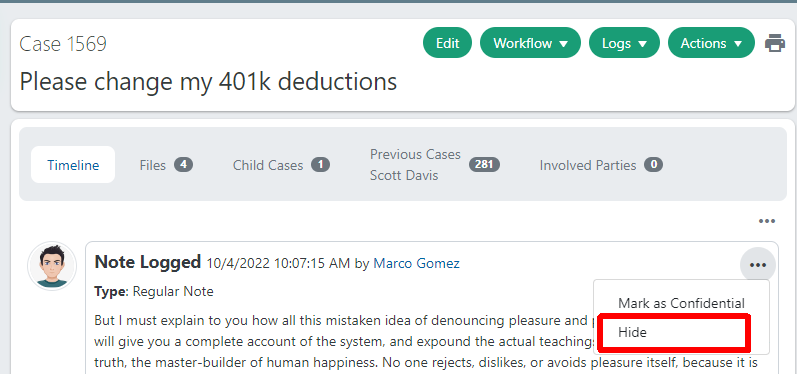
- Navigate to the note you'd like to hide.
- In the upper-right corner of the note, click the
...menu , then click Hide.
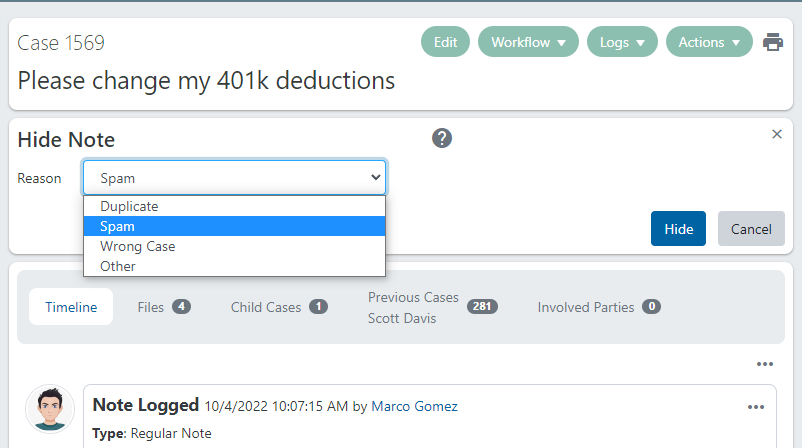
When hiding a note, the application will prompt the user for a reason. This is a configurable list. See below for more details.
Hidden Note
This is how a hidden note will appear in the timeline (assuming the user has the View hidden notes and emails permission)
If the user does not have the View hidden notes and emails permission, then the note will be completely hidden from the timeline, when viewed by that user.
Unhiding
To unhide a note:
- Navigate to the hidden note you'd like to unhide.
- Click Show to view the hidden note and menu
- In the upper-right corner of the note, click the
...menu , then click Unhide.
Permissions
There are new permissions available:
- Case: Hide notes and emails This grants permissions for users to hide a note or email.
- Case: Unhide notes and emails This grants permissions for users to hide a note or email.
- Case: View hidden notes and emails This grants permissions for users view a hidden note or email. Without this permission, the "Note Hidden" timeline entry doesn't display at all
For normal (non-sys-admin) users, in order to hide a note, they must:
- Be granted the Hide permission
- Be the owner of the case
- The case must be open
A SysAdmin can hide a note on a case, even if they are not the case owner. They do not need to explicitly be granted the Hide/Unhide permissions.
Related: What is a SysAdmin in Dovetail?
Important!
These permissions are not explicitly set (to Granted or to Not Granted), meaning that by default, they will follow the permission that applies to the overarching Cases category of permissions.
Please review your permission sets, and adjust these accordingly.
It is recommended to do this in your test environment first, and be prepared for any permission changes you may wish to make when this feature is released into production.
Reason
The list of reasons is a configurable list named "Hide Reason", which can be edited using the List Editor.
Apps -->Setup --> Lists --> List Editor --> HideReason
Additional Information - Portal
Hidden notes will not be displayed when viewing a case within the Dovetail Portal
Additional Information - API
The Case Timeline API (/api/v5/cases/CASEID/timeline) can include hidden entries.
If the api user has the Case: View hidden notes and emails permission, then the timeline collection will include new elements of type HiddenEntry. Within that element, will be a hiddenLog of type Notes or Email. There is also a hiddenReason element.
If the api user does not have the Case: View hidden notes and emails permission, then hidden entries will not be returned in the response.
Example:
        {
            "id": "2405cb7a-6069-48c0-80d3-af2401111b5b",
            "type": "HiddenEntry",
            "activityType":

   null,


   "timestamp":
   "2022-10-04T16:34:21.096329Z",


   "performedBy": {

             ...

            },


   "fromEmployee":

    null,


    "details": {


    "notes":
    "",


    "logType":

     null,


     "timestamp":
     "2022-10-04T16:34:21.096329Z",


     "user": {

                 ...

                }

            },


     "hiddenLog": {


     "id":
     "350507aa-8c9b-4d94-84d2-af2401110aed",


     "type":
     "Notes",


     "activityType":

      null,


      "timestamp":
      "2022-10-04T16:34:07.075502Z",


      "performedBy": {

                 ...

                },


      "fromEmployee":

       null,


       "details": {


       "fromEmployee":

        null,


        "notesLogType":
        "Regular Note",


        "isInternal":

         false,


         "notes":
         "

           another note
           "
          ,


         "logType":
         "Notes",


         "timestamp":
         "2022-10-04T16:34:07.075502Z",


         "user": {

                     ...

                    }

                }

            },


         "hiddenReason": {


         "listName":
         "HideReason",


         "key":
         "Spam",


         "displayText":
         "Spam"

            }

        }
Version
- This functionality is new, as of version 2022.6