Enhancements and Fixes for the HR (Agent) app; Enhancements to the Dovetail APIs
Query Sharing and Favorites
Queries can now be shared to other users.
For example, a power user may create a useful query, and then that query can be shared to everyone in department.
Queries can be shared to individual users, everyone in a department, everyone in a workgroup, or to everyone in the system.
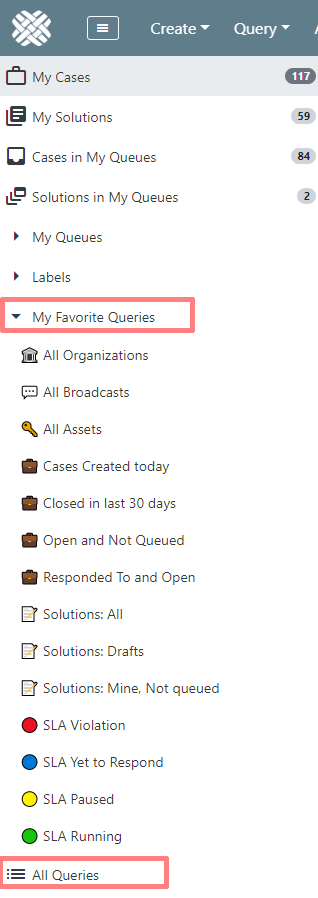
Left sidebar changes
In previous versions, the left sidebar had an expandable category for My Queries. This has been removed, and replaced with My Favorite Queries, and All Queries.
- My Favorite Queries are just that - queries that a user has designated as their favorites.
- All Queries will show you not only all of the user's queries, but also queries that have been shared to them.
Now, a user can have many queries, but only their favorite ones will be included in the sidebar.
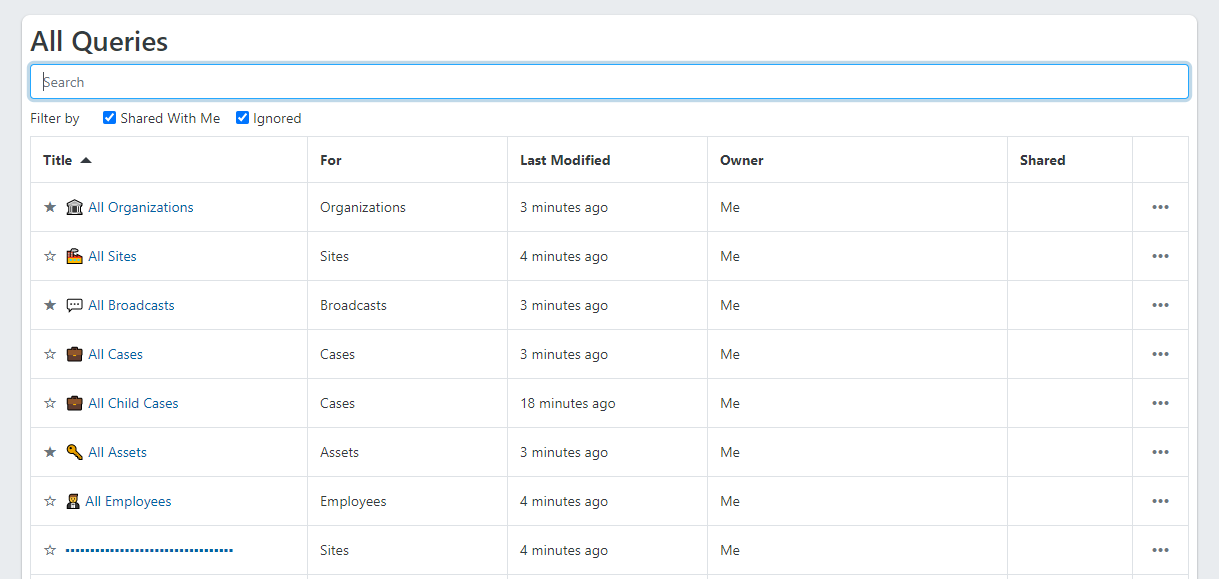
All Queries page
This will display all of a user's queries, including ones created by the user, and ones shared to the user.
- The Search box allows for filtering down the list of queries. Search by title, entity type (cases, solutions, sites, etc.) and owner.
- The Shared with me checkbox will display/hide those queries that have been shared to the user
- The Ignored checkbox will display/hide shared queries that the user has Ignored.
- Click a heading in the grid to sort the list by Title, entity type (cases, solutions, sites, etc.), last modified, and owner. Click once to sort ascending, click again to sort descending.
Favorite a query
From the query itself, open the Query Actions menu, and choose Favorite.
OR
From the All Queries page, click the star icon, which will change the icon to a filled star, indicating that it's a favorite.
Unfavorite a query
From the query itself, open the Query Actions menu, and choose Unfavorite.
OR
From the All Queries page, click the star icon, which will change the icon to an unfilled star.
Share a query
To share a query, open the query actions menu, and choose Share.
OR
From the all queries page, open the actions menu, and choose Share
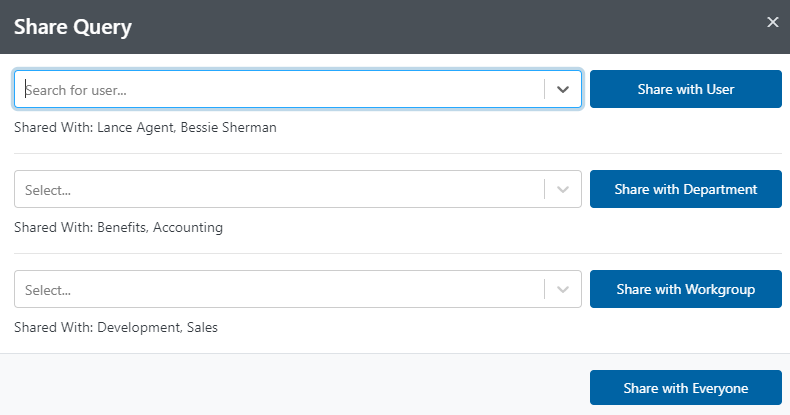
This will open the Share Query modal.
From here, you can pick a user, department, or workgroup, and then share. You can also choose to share to everyone.
This page will also display who the query has already been shared with.
Note: Built-in queries cannot be shared, as everyone already has access to them. (My Cases, My Solutions, Cases in My Queues, Solutions in My Queues)
Ignore a query
If a query has been shared to a user, the user can choose to Ignore that query. This simply hides it within the list of All Queries
Click the Ignored checkbox, and then that query will be displayed again.
Ignored queries will display with an Ignored icon: 
Delete a shared query
If the owner of a query attempts to delete a query that has been shared to others, the application will first warn them: "This query is shared to others. Deleting it will also delete it for them.".
The user can then confirm the Delete action, or Cancel it.
New keyboard shortcuts for queries
fToggle Favorite/UnfavoritesShare QuerydDownload QueryrRefresh Query Results
As a reminder, you can use the ? keyboard shortcut to view the list of available shortcuts
Edit Case Page
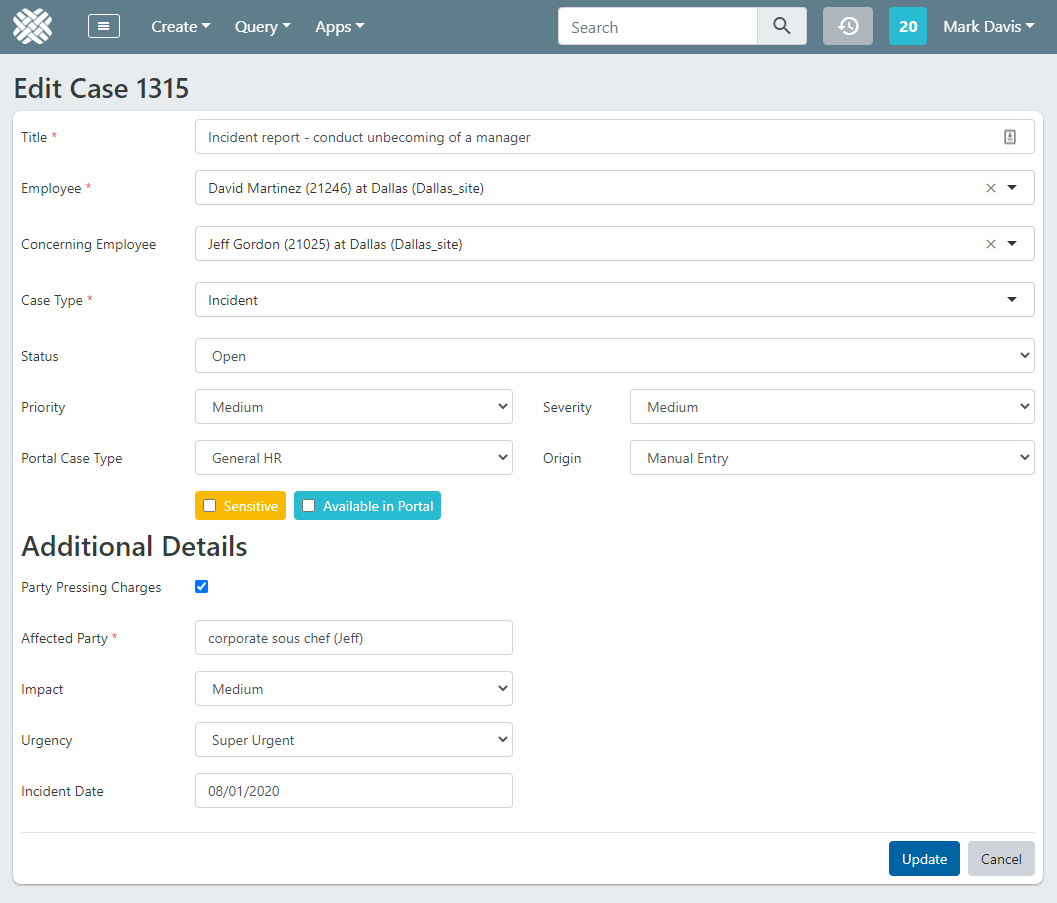
In previous versions, there were two modals (pop-ups) for editing case information: one for editing the core case details, and one for editing the Additional Details (Flexible Attributes).
Now, there is a new Edit Case page, which contains all of that on the same page - allowing for editing the core case details and additional details on the same page at the same time.
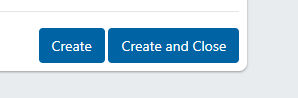
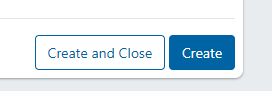
Improve the User Experience of the "Create" and "Create and Close" buttons on the Create Case page
- Move the Create button to the far-right (which would be the primary action location)
- De-emphasize and distinguish the "Create and Close" button by not having it be the primary action color
Old:
New:
New and enhanced APIs
For full details, refer to the online API documentation, available at https://YourTenant.dovetailnow.com/api/doc. Example: https://sandbox.dovetailnow.com/api/doc
New API to create/update flexible attributes
Example:
PUT /api/v5/cases/1234/flexibleAttributes
Example Request:
{
    "flexibleAttributes": [
        { key: "Urgency",

   value:
   "ReallyUrgent" },

        { key:
   "IncidentDate",

    value:
    "2020-04-20T05:00:00.000Z" }

    ]

}
Updated Case API now returns flexible attributes in the response
Include case flexible-attributes in GET /v1/cases API response #7180
Example:
GET /api/v1/cases/1234
Example Response:
{
"identifier": "1234",
"title": "this is the case title",
...
,
"flexibleAttributes":
[
    {
        key: "workgroup"
        label: "Workgroup list"


   value:
   "Support"

        valueText:
   "Support"

        dataType:
   "List"

        listName:
   "Workgroup"

        isRequired:

    false

        displayOrder:
    0

    }

]
Additional Changes
$CURSOR_POS$ variable in templates is not working correctly in Internet Explorer