Skip to content
English
  • There are no suggestions because the search field is empty.

Release Notes - Dovetail 18.4. HR app, Portal app


18.4

Enhancements and Fixes for the HR (Agent) app, and the ESP (Employee Service Portal) app.
The layout/design of the case page in the Portal application has changed a fair amount. More details below.

HR App (Agent)

Issue
Type
Application
Interface Change?
Issue #
Autosave drafts (case notes/emails; solutions). More details below.
Enhancement
Agent
Yes
6941
Event Rule Action - Create Child Case - new option available to set the concerning employee to the same concerning employee as the parent case
Enhancement
Admin
Yes
6804
Improve display of email addresses in email headers
Enhancement
Agent
Yes
6899
Long employee names and job titles are not wrapping properly on the show-case page in Internet Explorer 11
Fix
Agent
No
6925
A wide table within a case timeline entry is not being properly width-constrained, which could cause the page to render very wide, with a horizontal scrollbar
Fix
Agent
No
6974
Solution Page: Solution Filters not appearing if there are parent items without children (in the Solution Filters list)
Fix
Agent
No
7041
Submitting a form (such as Log Notes) while one of the rich-text editor tooltips is displayed (such as ""Unordered List"") was not clearing the tooltip, causing the tooltip to remain displayed on the page.
Fix
Agent
No
7038
Rules Engine: Event rules should only update the case columns it needs to update instead of doing a full-row update. This should help with data inconsistencies due to race conditions.
Fix
Rules Engine
No
7054
SLA could incorrectly breach after case is closed
Fix
SLA
No
6762
Concerning employee data in popover information is incorrect on the show-case page (it was showing the employee's data)
Fix
Agent
No
6990

Portal

Issue
Type
Application
Interface Change?
Issue #
Case page layout/design changes. More details below
Enhancement
Portal
Yes
515
Close Case action button on show-case page, allows for an employee to close a case. This feature can be enabled/disabled by the Dovetail implementation/support team
Enhancement
Portal
Yes
193
Reopen Case button on show-case page, allows for an employee to re-open a closed case. This feature can be enabled/disabled by the Dovetail implementation/support team
Enhancement
Portal
Yes
84
Improve consistency of how timeline entries are displayed. Include additional entries (Created, Closed, Reopened, File Added)
Enhancement
Portal
Yes
517
On the create-case page, ""Upload Files"" is now a button, as opposed to a link. This makes it consistent with the show-case page.
Enhancement
Portal
Yes
515
If a welcome page or help page template is not defined for the employee's current culture, fallback to the en-US template. This is to prevent employees from seeing an empty home or help page
Enhancement
Portal
No
94
When an employee navigates from a solution page to the new case page and creates a case, the solution information (title and URL) are automatically appended to the end of the initial case note. Previously, when viewing that note in the HR Agent app, that URL was not saved and rendered as a clickable link. It now is.
Enhancement
Portal
No
117
An employee can no longer add notes or upload files to a closed case within the Portal app. They can Reopen the case, and then add notes or upload a file.
Change
Portal
No
N/A
Home page - Most Visited Pages ""last modified"" time is incorrect
Fix
Portal
No
667
Missing a localization for ""Type something"" placeholder text, on the new case page and on the log notes form on the existing case page.
Fix
Portal
No
677
Center the logo on the login page
Fix
Portal
No
472
Show search results automatically when the employee types in the search box in the page header. This functionality used to exist, and was inadvertently removed in a previous version.
Fix
Portal
No
685
Solution page: Adjust the width of the sidebar cards (related, files). Should be the same width as the case page sidebar cards. This was inadvertently changed in a previous version.
Fix
Portal
No
701
Incorrect word breaks in solution content when using Internet Explorer. Words could break in the middle of a word.
Fix
Portal
No


Agent - Autosave drafts

When a user crafts a note or email on a case, the content will be automatically saved as a draft.
If the user navigates away from the page and returns, a button will appear that will allow the user to restore the draft. Hitting Esc (which dismisses the form) will not delete the draft.

Drafts are automatically saved:

  • Notes on the create-case page
  • Log Notes on the show-case page
  • Log Email on the show-case page
  • Description & Resolution on the create-solution page
  • Description & Resolution on the edit-solution page

The draft will be deleted when:

  1. The user clicks the ‘x' on the log note/email form, or
  2. The user clicks ‘Cancel' on the log note/email form, or
  3. The user submits (saves) the form, or
  4. The draft expires (after 7 days)

The reason for letting the user selectively load the draft is to try and avoid unexpected behavior on multiple fronts. Emails can be triggered from multiple spots (reply, reply all, forward from any number of timeline entries, and the log email menu item), so automatically overwriting the default text with a draft could be undesired. Also, we are not persisting any other field in the forms, only the text input. If we auto-filled the body with the draft, we could give the user the sense they are simply picking up where they left off which is incorrect. Any dropdowns/confidentiality changes are not persisted, so we don't want to mislead the user.
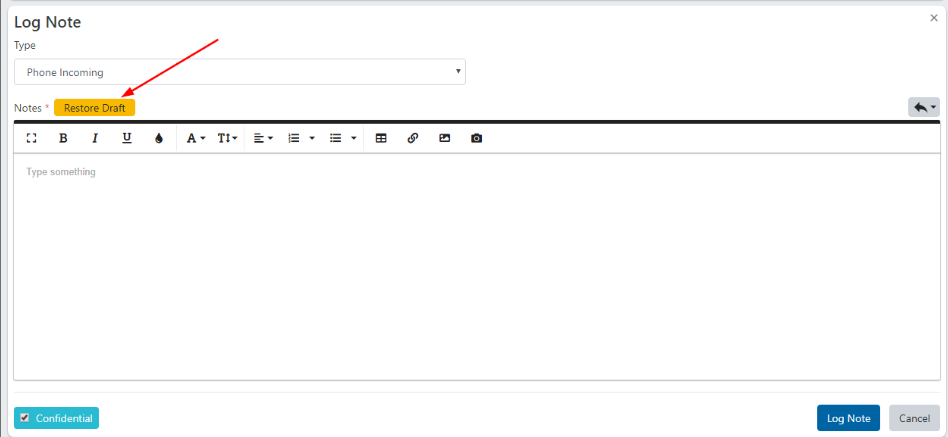
image.png

Portal - Case page changes

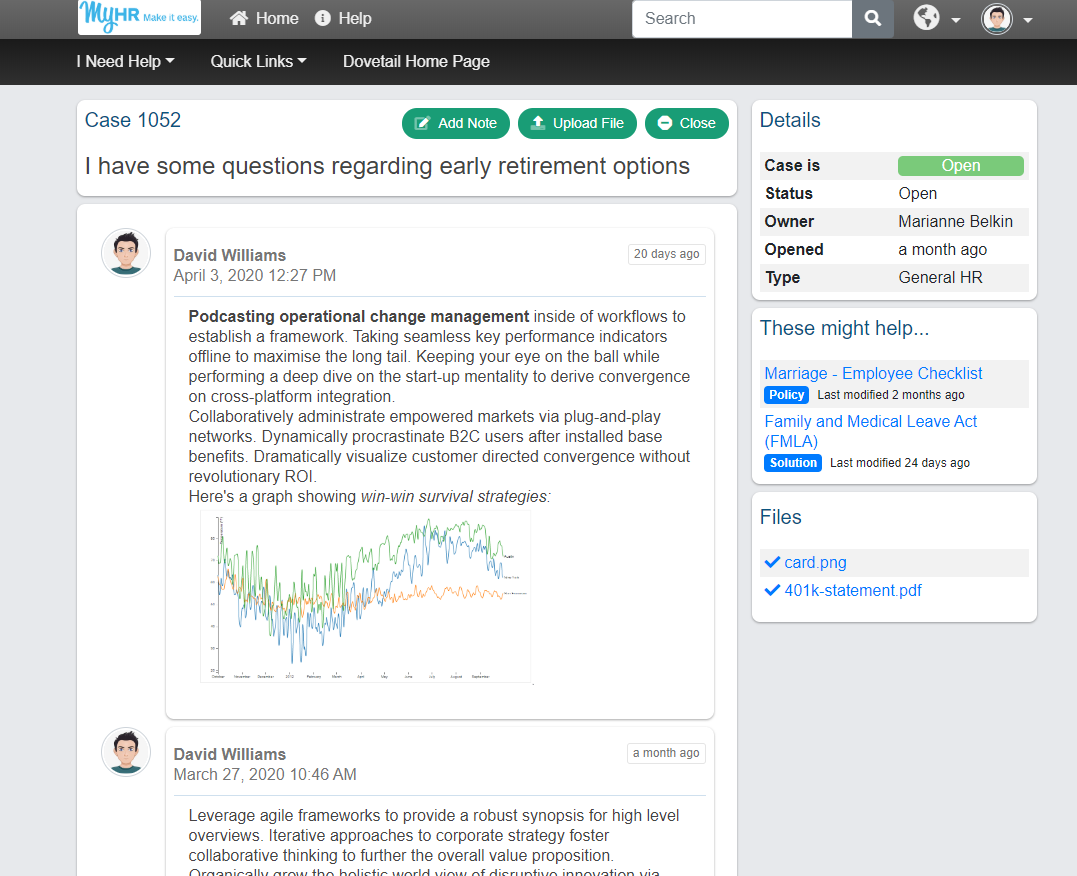
  • Overall page layout has changed.
    • Right side has "cards" for Case Details, File Attachments, and Related Solutions.
    • Top "card" contains Case ID, Case Title, and Action buttons (Log Notes, Upload File)
  • File uploads start immediately (as opposed to having to click Submit)
  • Progress bar for files that are uploading
  • Reopen Case button (if case is closed, and the Reopen Case feature is enabled)
  • Close Case button (if case is open, and the Close Case feature is enabled)
  • On the create-case page, "Upload Files" is now a button, as opposed to a link.
  • Drag and drop for uploading file attachments has been removed from the show-case page
portal.png


Agent version 18.4, ESP (Portal) version 2020.3