Version 18.1
Enhancements and Fixes for the HR (Agent) app, and the ESP (Employee Service Portal) app.
Release Notes - What's New in v18.1
November 2019 Reports update
Release Type: Reporting
18.0.9
Release Type: Service Release
18.0.8
Release Type: Service Release
Version 18
Release Type: Major Release
Release Notes - What's New in v18
August 2019 Reports update
Release Type: Reporting
New Categories
- SLA
- SLA Definition
- SLA Control Point
- Case View Log
- Solution View Log
New Joins
- Outer join from Case to SLA (outer join as a case may not have a sla)
- Outer join from SLA to SLA definition (outer join as we want to be able to traverse case --> sla --> sladefinition)
- Outer join from SLA Definition to SLA Control Point (outer join as it's allowed to have a sladefinition without any control points)
- Outer join from Case Activity Log to SLA (enable reporting off of sla activities on a case. sla added, removed, etc.)
This enables
- Creation of Case SLA reports. For example, for a set of cases, display associated SLA, control point, Initial Response information, SLA violation, Target resolution information, etc.
- Creation of SLA Admin reports. For example, a report on just the SLAs that are defined in the system using only the SLA Definition category. Optionally, join in the SLA Control Point category, which would also provide for the control points. Note that there can be zero or many control points for a SLA definition.
- Creation of SLA activity reports (SLA added, SLA removed, etc.)
- Creation of Portal Page View reports
Version 17.12
Release Type: Service Release
July 2019 Service Release - Portal
Release Type: Service Release
Version 17.11
Release Type: Service Release
Version 17.10
Release Type: Service Release
June 2019 Service Release - Reporting
Release Type: Service Release
Version 17.9
Release Type: Service Release
Version 17.8
Release Type: Service Release
Reporting based stats are now calculated hourly, instead of real time
The following calculated reporting fields are no longer calculated in real-time. Instead, they are calculated hourly, and stored in the database.
This allows for much faster reports that display these calculated pieces of data. The downside is that it's not real-time, but may be out of data by no more than 60 minutes.
These fields are typically used in historical reports (nightly/weekly/monthly/yearly), as opposed to real-time dashboards.
This is the list of reporting fields that are now calculated and stored hourly:
- FirstCloseDate
- FirstCloseResolution
- FirstReopenDate
- LastCloseDate
- LastCloseResolution
- LastReopenDate
- NumAttachments
- NumNotesLogged
- NumTimesClosed
- NumTimesReopened
- NumUpdates
- TotalMinutesToFirstClose
- TotalMinutesToLastClose
April 2019 Service Release - Reporting
Release Type: Service Release
Version 17.5
Release Type: Service Release
Version 17.4
Release Type: Service Release
New event rule action - Assign case to user
Example: When a case is created with a case type of "Time Off", or a case's type is changed to "Time Off", automatically assign the case to the user "Danielle Davis".
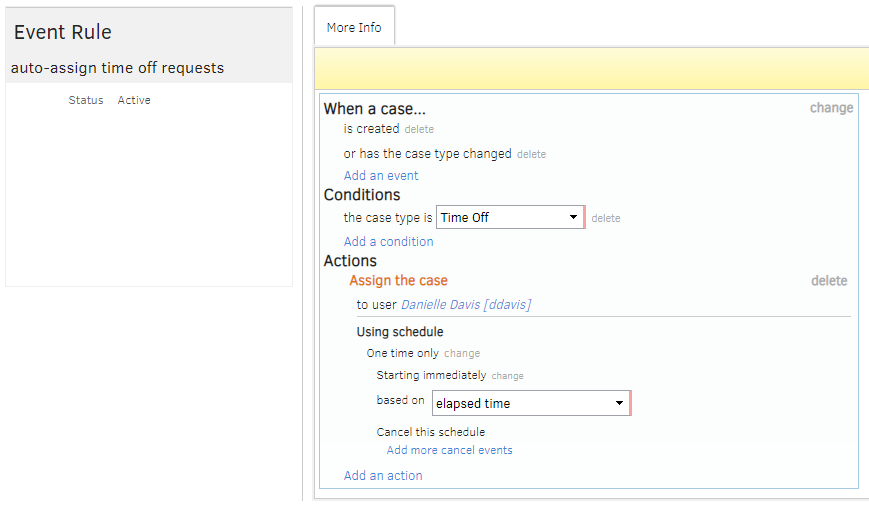
Note: If the user is Inactive, the auto-assign will not happen, and a message will be logged to the case timeline. Example: Event Rule Error. Target User 'ddavis' of Assign must be Active
January 2019 Reports update
Release Type: Reporting
Reports will be moving from one folder (Default Reports) to subfolders based on report types. Because of the move into folders, any scheduled versions of the current Default Reports will need to be rebuilt following the update.
New reports and dashboards are also available.
Complete details about the January 2019 Reports update are available here
Version 17.3
Release Type: Service Release
div element with a
data-module attribute)
Version 17
Release Type: Major Release
Release Notes - What's New in v17
Reference