Marketing
Dovetail Check, Track and Trace
Overview
- Employee logs into the Dovetail Portal app
- Employee navigates to the
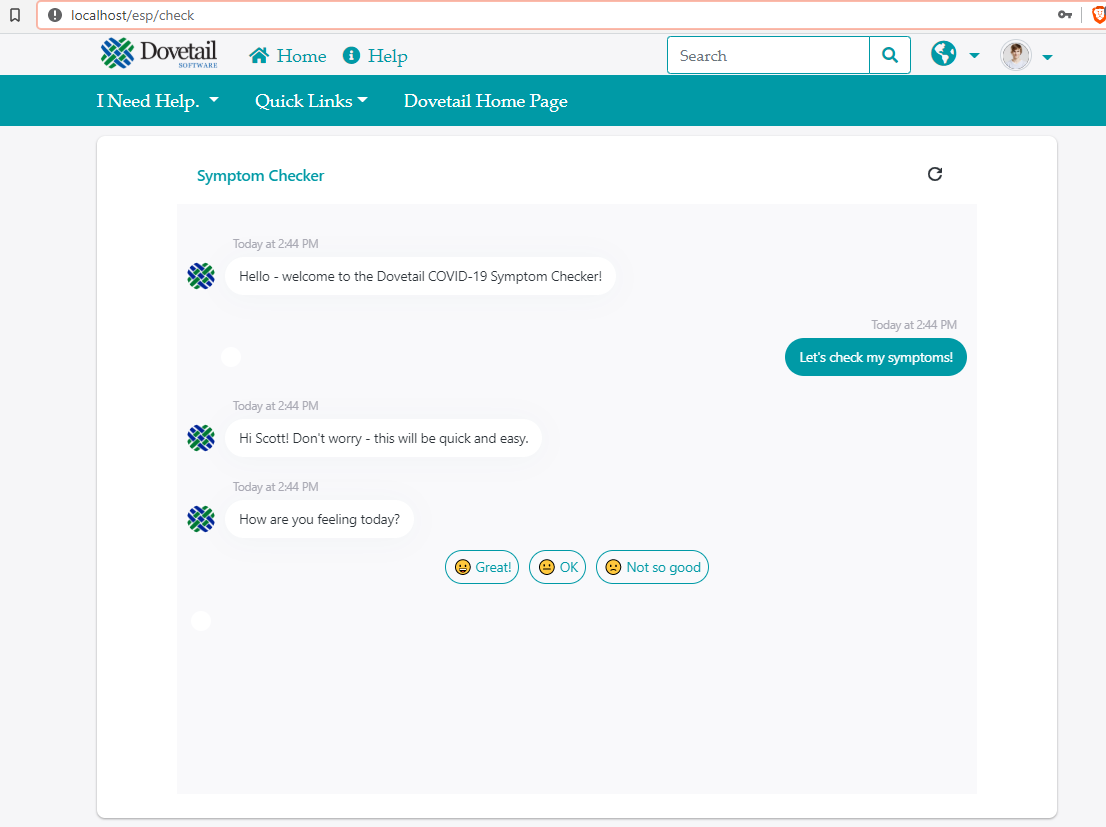
/checkpage in the app - That page contains some sort of survey/form/bot that asks health questions. This form/survey is from a 3rd party, such as a FlowXO bot, Wufoo form, etc.
- Once the form/survey is submitted, the 3rd party app will make an API call to the Dovetail Case API, in order to create a case in Dovetail
- Within Dovetail, events rules fire, and SLAs are applied, as needed.
Setup
- Create a 3rd party form/bot
- Craft that form/bot so that it calls into the Dovetail create-case API when needed.
- Copy its embed code (iframe, javascript, etc.)
- The check page in the app gets its content from the ESP Website - CheckPageContent application setting. Add your 3rd party code into that application setting.
- Navigate to the
/checkpage in the Portal app - Fill out the form, and submit.
- A case may get created in Dovetail (depending on your answers and how the form/bot is configured)
CheckPageContent - Variables
When the Portal app reads this setting, it will also dynamically resolve variables. This allows for pushing employee-specific data (such as name or employee ID) into the 3rd party form/bot.
Note: these are case sensitive!
The following variables are supported:
%Employee_FirstName%
%Employee_LastName%
%Employee_EmployeeId%
%Employee_Title%
%Employee_JobTitle%
%Employee_PrimaryPhoneNumber%
%Employee_PrimaryEmailAddress%
%Employee_Home_PhoneNumber%
%Employee_Home_EmailAddress%
%Employee_LoginCredentials_Username%
%Employee_Avatar_Image_Url%
%Employee_PrimarySite_Identifier%
%Employee_PrimarySite_Name%
%Employee_PrimarySite_SiteType%
%Employee_PrimarySite_Website%
%Employee_PrimarySite_AlternateName%
%Employee_PrimarySite_Phone%
%Employee_PrimarySite_Fax%
%Employee_PrimarySite_Organization_Identifier%
%Employee_PrimarySite_Organization_Name%
%Employee_PrimarySite_Organization_OrganizationType%
%Employee_PrimarySite_Organization_Status%
%Employee_PrimarySite_Organization_Website%
%Employee_PrimarySite_SupportSite_Identifier%
%Employee_PrimarySite_SupportSite_Name%
%Employee_PrimarySite_SupportSite_SiteType%
%Employee_PrimarySite_SupportSite_Website%
%Employee_PrimarySite_SupportSite_AlternateName%
%Employee_PrimarySite_SupportSite_Phone%
%Employee_PrimarySite_SupportSite_Fax%
%Employee_PrimarySite_SupportSite_Organization_Identifier%
%Employee_PrimarySite_SupportSite_Organization_Name%
%Employee_PrimarySite_SupportSite_Organization_OrganizationType%
%Employee_PrimarySite_SupportSite_Organization_Status%
%Employee_PrimarySite_SupportSite_Organization_Website%
Example - FlowXO bot
CheckPageContent
<iframe


    style
   ="border: none; margin:0px; display: block; width:100%;height:650px;"


   xml=
   "lang"


    src=
    "https://fxo.io/m/95nm7dv8?firstName=%Employee_FirstName%&employeeId=%Employee_EmployeeId%"  >


     iframe>
UI
Example - HTTP Request
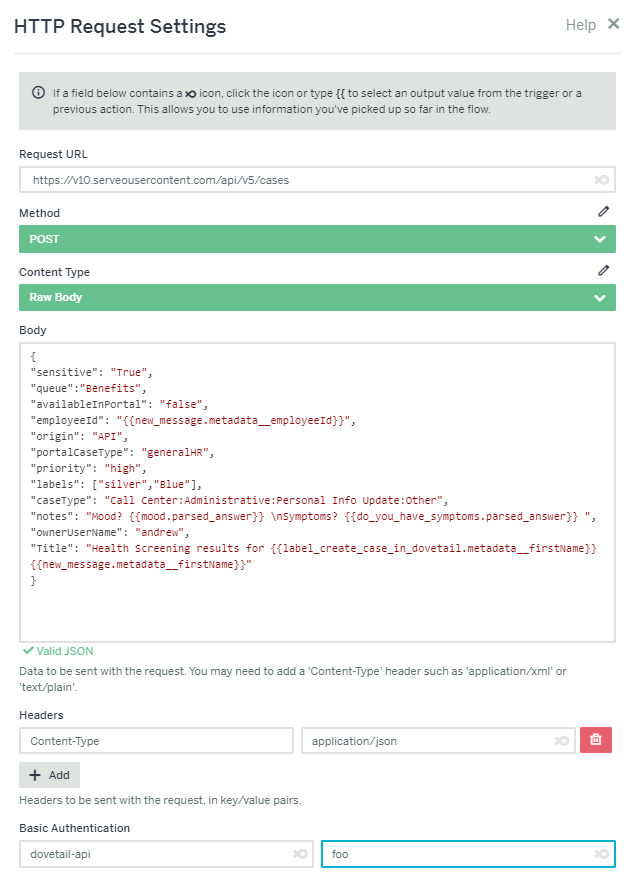
This is an example of the HTTP request body from FlowXO into the Dovetail v5 case API
 {


   "sensitive":
   "True",


    "queue":
    "Benefits",


     "availableInPortal":
     "false",


      "employeeId":
      "",


       "origin":
       "API",


        "portalCaseType":
        "generalHR",


         "priority":
         "high",


          "labels": [
          "silver",
          "Blue"],


           "caseType":
           "Call Center:Administrative:Personal Info Update:Other",


            "notes":
            "Mood?  \nSymptoms?  ",


             "ownerUserName":
             "andrew",


              "Title":
              "Health Screening results for  "

}
Notes
- Notice the use of
. What we're doing is pushing the employeeId into flow XO (via a querystring parameter in the "src" of the iframe), and then pushing that data back to Dovetail in the create-case API call. This allows us to create the case in Dovetail for the correct employee. - Notice the
\nwithin the notes field. This will render as a newline within the Agent app.
How that looks in the FlowXO UI
Example - Wufoo Form
CheckPageContent
<h2>Careers
   h2>
<iframe

    title
   ="Embedded Wufoo Form"

   allowtransparency=
   "true"

    frameborder=
    "0"


     style=
     "width:100%;height:1100px;border:none"


      src=
      "https://gsherman.wufoo.com/embed/m1ykki471978p0d/">


      <a

        href
       =
      "https://gsherman.wufoo.com/forms/m1ykki471978p0d/">Fill out my Wufoo form!

       a>


       iframe>
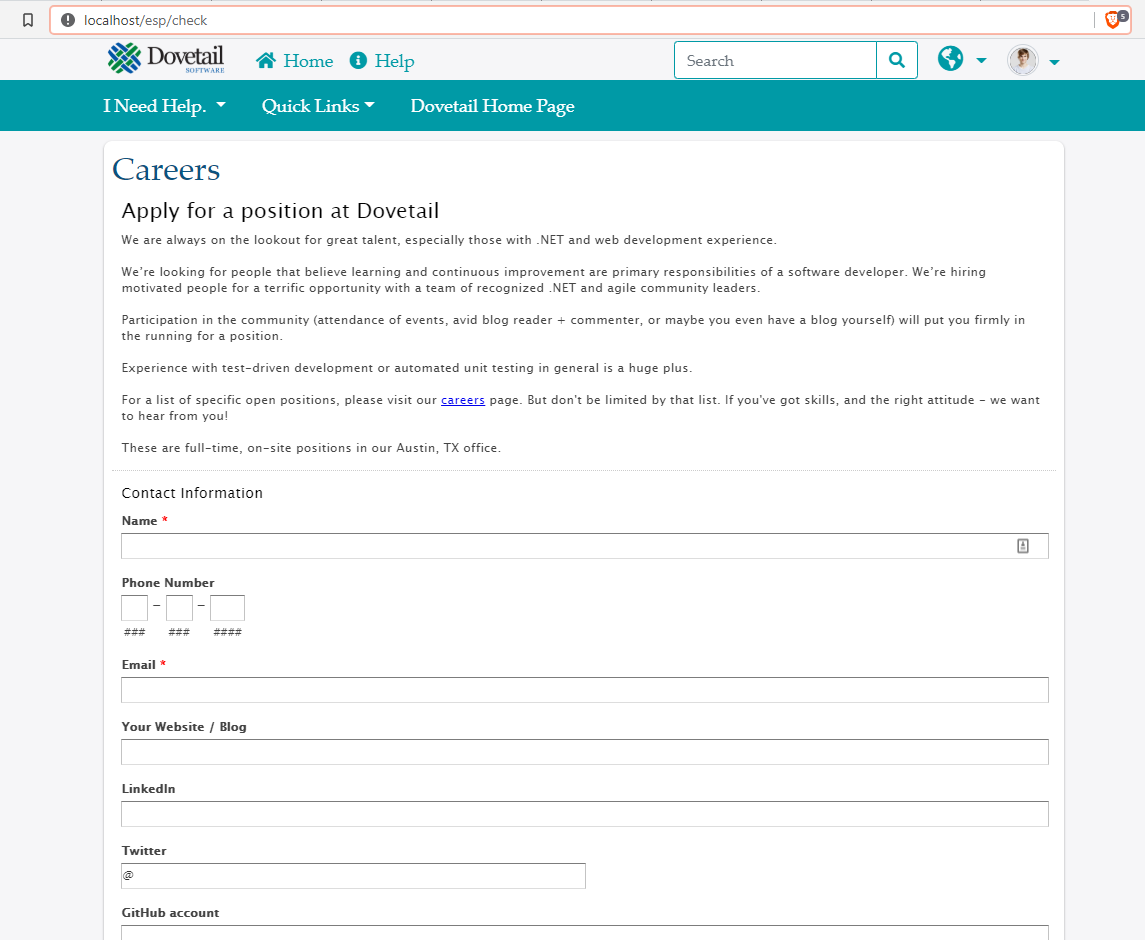
UI
Notes
Obviously, that's using a Job Application form, and not a Health Screening form. It's purely meant as an example of using a Wufoo form.